
How to get data from a website?
Originally published in 2018. Updated in May 2026 with current methods, a comparison of extraction approaches, 2026 compliance considerations, and a new FAQ section.
The value of web data is increasing in every industry, from retail competitive price monitoring to alternative data for investment research. Getting data from a website can be central to the success of a business. As research firm Gartner put it:
"Your company's biggest database isn't your transaction, CRM, ERP, or other internal database. Rather it's the web itself… Treat the internet itself as your organization's largest data source."
That statement has aged well. The internet remains the largest source of business data on earth, and it keeps growing. Global data creation is now expected to reach around 221 zettabytes in 2026, an increase of roughly 22% over the prior year, according to industry tracking from Statista and others.
The need for web data integration is greater than ever. This article walks through a simple process for pulling data from a webpage using Import.io, with updated context for how teams build out from there in 2026.
First, a quick look at how businesses use web data.
How do businesses use data from a website?
Competitive price monitoring and alternative data for equity research are two well-known uses of website data, but there are many others. Here are examples by team type, updated to reflect how web data is used across enterprise organizations today:
Pricing teams monitor competitor prices, promotions, and availability on a daily or hourly basis to protect margin and respond faster to market moves. More on this in the pricing intelligence guide.
Digital shelf and ecommerce teams track brand presence across retailers, including search rank, content accuracy, image compliance, availability, and reviews. The digital shelf analytics page covers this in more depth.
Category and merchandising teams track assortment shifts, promotional pressure, and competitor moves at the category level.
Insights and market intelligence teams answer ad-hoc questions about brands, products, and consumer behavior without waiting on a data engineering ticket. Companies like XiKO have built market intelligence offerings on this kind of structured web data, applying linguistic models to large volumes of consumer feedback.
Data engineering teams use managed web data feeds as one input among many, freeing internal engineers to work closer to the product. Earlier examples include ClearMetal, a predictive logistics company that used web data to mine container and shipping information for global trade.
AI and analytics teams build training datasets and real-time signals from public web information. StoryFit, for example, used Import.io extractors to feed NLP models that predict which manuscripts may become hit movies.
Real estate and marketing teams use listing data to identify customers and develop performance metrics. Virtuance used this approach to determine which real estate listings would benefit from professional marketing and photography.
The list keeps growing. Once you can reliably get data from a website, the question shifts from "can we collect this?" to "what should we do with it?"
Now, here are the steps that show how to pull data from a website using Import.io.
Steps to get data from a website
Websites are built for human consumption, not machines. So it is not always easy to get web data into a spreadsheet for analysis or machine learning. Copying and pasting from websites is time-consuming, error-prone, and rarely repeatable at scale.
Web scraping is the process of sending a request to a webpage, parsing the HTML for specific items, and organizing the result into structured data. If you do not have an engineer on hand, Import.io provides a no-code, point-and-click web data extraction platform that makes it straightforward to get web data.
Here is a quick tutorial on how it works.
Step 1. Find the page where your data is located.
For example, a product listing or category page on Amazon.com.
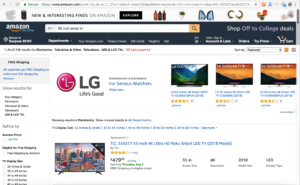
Step 2. Copy and paste the URL into Import.io to create an extractor.
The extractor will attempt to detect the structured data on the page automatically.

Step 3. Click "Go" and Import.io will query the page.
The platform uses machine learning to determine what data you most likely want from the page.
Step 4. Review the extracted data and adjust if needed.
In this example, we want product images, names, and prices in separate columns. To train the extractor where needed, click the top three values in a column. The extractor then outlines all matching items in green and applies that pattern down the rest of the rows.
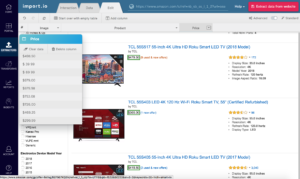
Step 5. Import.io populates the rest of the columns.
Names, prices, and other fields are filled in based on the pattern you confirmed.
Step 6. Click "Extract data from website".
This kicks off the actual extraction job.
Step 7. Add pagination if the listing spans multiple pages.
Import.io detects pagination automatically. You can specify how many pages to include, so every product in the category ends up in your spreadsheet.

Step 8. Download the dataset.
You can now download product names, prices, and images.

Step 9. Download names and prices into an Excel spreadsheet.
The data downloads as CSV or Excel and is ready to use in dashboards, reports, or other tools.

Step 10. Download images as a ZIP file.
Useful when populating your own marketplace, internal catalog, or website with product imagery.

What else can you do with web scraping?
This is a basic look at getting one listing page of data into a spreadsheet, and one set of images into a ZIP file. There is much more you can do, such as:
- Link this listing page to data on the detail pages for each product.
- Schedule a change report to run daily and track when prices change or items are added or removed from the category.
- Compare product prices on Amazon to other online retailers, such as Walmart, Target, and others.
- Visualize the data in charts and graphs using.
- Feed this data into your internal processes or analysis tools via the Import.io APIs.
Web scraping is a powerful, automated way to get data from a website. If your data needs are large or the websites are tricky, Import.io offers data as a service and will get your web data for you.
2026 update: what has changed since this article was first published
A lot has changed since 2018. The Import.io tutorial above still works the same way, but the wider landscape of web data extraction has matured in five important ways. Here is what is worth knowing in 2026.
Five ways to get data from a website in 2026
Manual copy and paste is still where many people start, and it is fine for a handful of values on a single page. Beyond that, four other approaches now cover most situations.
Official APIs are the cleanest option when a website publishes one and the fields you need are included. Many sites do not, or they restrict rate limits and historical access, which is where the rest of the methods come in.
Code-based scraping with Python libraries like BeautifulSoup, Scrapy, and Playwright gives engineering teams full control. The tradeoff is maintenance: pages change, anti-bot defenses get stronger, and a serious in-house scraper usually needs weekly attention. A 2026 benchmark from Proxyway across 15 heavily protected sites showed a 25-percentage-point gap between basic implementations (60–70% success) and top-tier tools (91–94%).
No-code extraction platforms like Import.io let analysts, pricing teams, and insights managers pull data without writing code. Modern versions use AI to detect fields automatically, which removes most of the selector work.
Managed web scraping services handle the scrapers, infrastructure, anti-bot defenses, validation, and delivery for you. This is the right fit when web data feeds something important: pricing decisions, daily reporting, dashboards, or AI training data. The web scraping as a service page covers this in more detail.
What AI has changed (and what it has not)
AI is now part of most extraction tools, though it shows up in different ways. Some platforms use it to detect fields automatically. Some use vision models to read pages with weak HTML structure. Some use it for entity matching across retailers, which is hard to do well with rules alone.
Recent research backs this up. McGill University researchers in 2025 tested AI-assisted extraction across 3,000 pages and reported 98.4% accuracy even when page structures changed.
One pattern does not work reliably: feeding raw HTML to a language model and asking it to return structured data. The outputs are inconsistent and validation is hard. Production systems use AI as one component inside a broader pipeline that also includes deterministic extraction, validation, and monitoring. More on this in how AI is changing pricing and digital shelf intelligence.
Compliance considerations in 2026
Public business data such as product listings, prices, and reviews remains broadly safe to collect, with case law in both the US and EU supporting this view. The rules tighten when personal data is involved. GDPR applies to personal information even when it appears on public pages, and the EU AI Act adds documentation requirements around training data sources. CCPA in California, DPDP in India, and similar laws shape what is acceptable in other regions.
Most enterprise programs keep scraping focused on non-personal commercial data and document their sources, purposes, and retention policies. If you are building a serious data operation, this part is worth getting right early.
Build vs buy: a short framework
A few rules of thumb that fit most teams:
- For one or two simple sources on a single project, a no-code tool is fastest.
- For many sources, frequent refreshes, validation, and integration into your data stack, a managed service is usually lower in total cost of ownership than building in-house.
- For a strong data engineering team working with stable sources, code-based scraping works, as long as you budget for ongoing maintenance.
Most enterprise programs use a mix: a no-code platform for analyst-led work, plus a managed service for the production feeds the business depends on.
Closing
No matter what or how much web data you need, Import.io can help. The platform extracts data from a website, then identifies, prepares, integrates, and delivers it for use in business applications, analytics, and AI workflows.
You can start by talking to a data expert to scope the right solution for your needs, or try the platform yourself. For teams that need reliable data from many websites without building and maintaining scrapers, web scraping as a service provides a fully managed alternative.
